10 Best Heat Sink For Pc Our Favorite Picks Compared
Many PC users face overheating issues that can slow down performance or even damage components. Choosing the right cooling solution is a key step to keeping your system running smoothly.
The best heat sink for PC offers an effective way to manage temperature without adding too much noise or bulk. This type of heat sink is designed for those who want reliable cooling for gaming rigs, workstations, or everyday builds. It helps maintain lower CPU temperatures, which can improve system stability and extend hardware life.
Plus, it often comes with easy installation features and sturdy construction. In this review, we’ll explore several popular heat sinks, comparing their cooling ability, design, and value. By the end, you should have a clearer idea which model fits your needs and setup.
Keep Your Cool: Top Cooling Solutions to Maximize Your PC’s Performance
| Image | Product | Price |
|---|---|---|
Pick 1  | Thermalright Peerless Assassin 120 SE CPU Cooler | Check Price On Amazon |
Pick 2  | Thermalright Assassin X120 Refined SE CPU Air Cooler | Check Price On Amazon |
Pick 3  | ARCTIC M2 Pro Heatsink Cooler for M.2 2280 SSD | Check Price On Amazon |
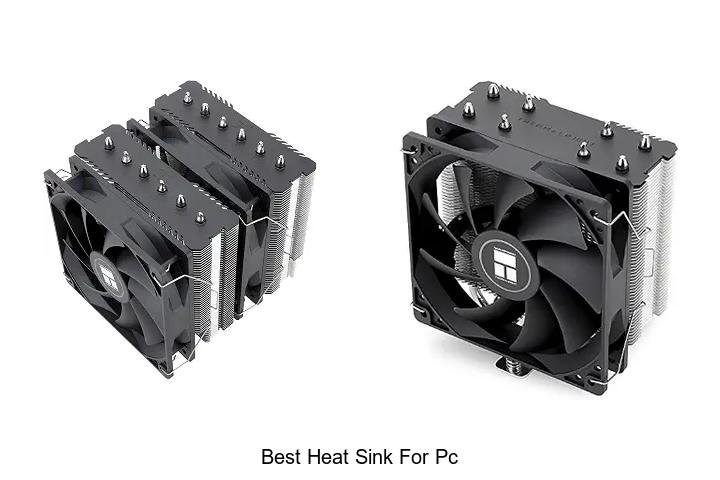
1. Thermalright Peerless Assassin 120 SE CPU Cooler
Offering impressive cooling power and quiet operation, this CPU cooler suits both AMD and Intel platforms. It features a dual-fan setup and six heat pipes designed to dissipate heat efficiently under heavy loads. Manufactured by Thermalright, a brand with over 20 years of experience, this cooler combines solid construction with advanced cooling technology.
The cooler’s dual 120mm PWM fans spin at 1550 RPM, delivering airflow up to 66.17 CFM while keeping noise levels low. Its full electroplating reflow welding and pure copper base ensure better heat transfer.
Installation is simplified with included metal fasteners compatible with common sockets. The size may require case compatibility checks but leaves room for memory modules, allowing versatile builds.
It manages to keep temperatures down even under demanding tasks, making it an excellent choice for gamers and professionals. Maintenance is straightforward, while the durable aluminum and copper materials promise lasting performance.
Overall, it balances performance, quietness, and installation convenience, suited for users seeking a reliable air cooler for various PC setups.
Pros
- Strong cooling with six heat pipes
- Quiet operation at 25.6 dB noise level
- Dual 120mm PWM fans for efficient airflow
Cons
- Requires checking case compatibility due to size
- Installation might be tricky for beginners
- Not suitable for very compact cases
Who Should Buy It?
Ideal for gamers, content creators, and PC builders needing effective air cooling. Best for those with mid to full tower cases who want quiet but powerful performance. Compatible with a wide range of Intel and AMD sockets, it suits varied desktop setups.
Key Specifications
| Specification | Details |
|---|---|
| Product Dimensions | 4.92″L x 5.31″W x 6.1″H |
| Cooling Method | Air |
| Heat Pipes Count | 6 |
| Fan Size | 120x120x25 mm (Dual Fans) |
| Maximum Rotational Speed | 1550 RPM |
| Noise Level (dB) | 25.6 |
| Air Flow Capacity (CFM) | 66.17 |
| Compatible Devices | Desktop |
| Material Type | Aluminium, Copper, Metal, Silicone |
| Power Connector Type | 4-Pin |
| Voltage | 12 volts |
The specifications highlight a robust air cooling system with six heat pipes and dual 120mm fans. These six copper heat pipes ensure effective heat dissipation from the CPU base to the fins. The dual fans spinning at a maximum of 1550 RPM help deliver a high airflow of 66.17 CFM, critical for cooling high-performance processors. Noise stays at a reasonable 25.6 dB, which keeps the environment quiet. The cooler fits in desktop devices and requires a 12 volt power supply connected via a 4-pin PWM connector, allowing precise fan speed control.
These specs impact performance by providing reliable heat transfer, maintaining system stability during demanding tasks or gaming. The aluminum and copper construction offers durability while efficiently conducting and dissipating heat. The PWM fans aid in balancing cooling power with noise reduction, which benefits those working or gaming in quieter settings. The physical dimensions require compatibility checks to fit cases comfortably, best suited for medium and large PC enclosures. Its easy installation hardware supports both Intel and AMD sockets, making it flexible for different builders.
2. Thermalright Assassin X120 Refined SE CPU Air Cooler
Offering a solid balance between performance and value, this CPU air cooler is designed for effective heat dissipation with quiet operation. Its four heat pipes and a 120mm PWM fan work together to keep your CPU temperatures low under various loads. Thermalright, a reputable Taiwanese brand with over 20 years in cooling technology, crafted this cooler with durability and compatibility in mind.
The aluminum heatsink cover adds to its sturdy build and helps efficiently disperse heat. The inclusion of AGHP technology tackles gravity effects, improving cooling performance in any PC orientation. Despite its compact size, it fits medium-sized cases while supporting both AMD and Intel sockets.
Installation is straightforward thanks to metal fasteners designed for multiple platforms. Its noise emission is kept low at 25.6 dB, ensuring a quiet computing environment.
Ideal for users seeking reliable cooling without spending a fortune, it fits well in builds prioritizing value and performance. Overall, it delivers consistent cooling with quality materials and thoughtful design, suiting casual gamers and home office setups alike.
Pros
- Efficient cooling with 4 heat pipes
- Quiet operation at 25.6 dB noise
- Supports a wide range of CPU sockets
Cons
- Fits only medium-sized cases
- Fan speed capped at 1550 RPM
- Aluminum heatsink less premium than copper
Who Should Buy It?
Ideal for those who want solid cooling without high cost. Perfect for casual gamers and general desktop users. Great for builds with AMD AM4/AM5 or Intel LGA 115x/1200/1700 CPUs.
Key Specifications
| Specification | Details |
|---|---|
| Product Dimensions | 4.72″L x 2.8″W x 5.83″H |
| Cooling Method | Heat pipe and fan-based |
| Heat Pipes Count | 4 |
| Fan Size | 120x120x25 mm |
| Maximum Rotational Speed | 1550 rpm ±10% |
| Noise Level (dB) | 25.6 |
| Air Flow Capacity (CFM) | 66.17 |
| Compatible Devices | Desktop |
| Material Type | Aluminium, Aluminum, Metal, Silicone |
| Power Connector Type | 4-Pin |
| Voltage | 12 volts_of_direct_current |
The CPU cooler measures 4.72 by 2.8 by 5.83 inches, making it suitable for medium-sized cases. It uses four heat pipes combined with a 120mm fan to manage heat efficiently. The cooling method relies on heat pipes and a PWM-controlled fan that adjusts speed for better thermal management. The fan runs at a maximum speed of 1550 RPM, operating quietly at 25.6 dB, and moves air at 66.17 cubic feet per minute. It connects via a 4-pin power connector and runs on 12 volts. The main materials include aluminum and silicone, ensuring good heat conduction and durability.
These specifications ensure stable and quiet cooling performance during regular computing and moderate tasks. The relatively modest fan speed reduces noise, making it a good fit for quiet workspaces. The use of four heat pipes offers efficient heat transfer from the CPU to the heatsink. Compatibility with popular AMD and Intel sockets makes it versatile for many desktop builds. Overall, these specs favor users who want an effective and reliable cooler that does not compromise on noise or build quality.
3. ARCTIC M2 Pro Heatsink Cooler for M.2 2280 SSD
Efficient heat management is crucial for maintaining M.2 SSD performance, and this heatsink cooler provides a premium solution. Designed specifically for M.2 2280 SSDs, it combines effective heat dissipation with easy installation.
The ARCTIC M2 Pro employs aluminum construction to absorb and dissipate heat swiftly, minimizing thermal throttling during heavy read and write operations. Its click mechanism eliminates the need for screws or rubber bands, simplifying installation for both single- and double-sided SSDs.
The included ARCTIC TP-3 thermal pads conform perfectly to the components, ensuring consistent heat transfer. Compatible with PCs and gaming consoles like PlayStation 5, it supports reliable long-term SSD performance.
Its compact dimensions and lightweight design do not compromise durability. Whether handling gaming, content creation, or intensive file transfers, this heatsink helps maintain peak SSD speeds. The solid build and included thermal pads boost overall value, making it suitable for anyone seeking durable, efficient cooling without complex setup.
Pros
- Excellent heat dissipation for high SSD performance
- Easy installation with click mechanism
- Includes high-quality thermal pads
Cons
- No active cooling (fans) included
- Limited to M.2 2280 SSDs
- May not fit other SSD sizes
Who Should Buy It?
Ideal for PC builders and gamers wanting to prevent SSD thermal throttling. Suits users with single- or double-sided M.2 2280 SSDs seeking hassle-free installation and reliable cooling improvement.
Key Specifications
| Specification | Details |
|---|---|
| Product Dimensions | 2.9″L x 0.9″W x 0.4″H |
| Cooling Method | Passive aluminum heatsink with thermal pads |
| Compatible Devices | M.2 2280 SSDs (single- and double-sided), PlayStation 5 |
| Material Type | Aluminum |
| Included Components | ARCTIC M2 Pro heatsink, ARCTIC TP-3 thermal pads |
| Item Weight | 40.5 g |
| Mounting Type | Click mechanism |
The compact size and lightweight design make this heatsink easy to install without adding bulk to your build. Its aluminum body efficiently absorbs and spreads heat away from critical SSD components. The inclusion of ARCTIC TP-3 thermal pads allows the heatsink to conform to the irregular surfaces of the controller, RAM, and NAND chips, optimizing heat transfer. This setup maintains a cooler SSD temperature during peak workloads, which is essential for maintaining consistent speed and longevity.
By providing passive cooling through the aluminum heatsink, the product reduces the risk of thermal throttling without generating noise. The click-style mounting cuts down installation time and eliminates the need for screws or bands, increasing convenience. This makes it especially useful for users seeking a straightforward upgrade to improve SSD cooling for gaming consoles or PCs. The focus on M.2 2280 drives makes it a perfect fit for most modern SSDs, combining durability and user-friendly design.
4. Large Aluminum Heat Sink 27 Fin Radiator Cooler

Effective cooling is essential for many electronic devices, and this large aluminum heat sink excels in that role. Designed with 27 finely spaced fins, it maximizes heat dissipation for stable performance during prolonged use. The heat sink measures 2.71 by 2.71 by 1.41 inches, offering a generous surface area to spread heat away from sensitive components.
Made from anodized aluminum, it combines lightweight and thermal conductivity, which enhances its heat transfer capabilities without adding much weight. The robust base board thickness of 4.6mm ensures durability and efficient heat conduction. Its passive cooling design removes the need for fans, resulting in silent operation that suits noise-sensitive environments.
This product is well suited to a variety of electronics including GPUs, power transistors, ICs, and amplifiers, helping prevent hardware failures caused by overheating. Installation is straightforward, thanks to panel mount compatibility, making it useful for both PC builders and general electronics projects.
Overall, it provides reliable cooling with a durable build and efficient heat transfer at a compact size, making it a solid addition for anyone managing heat in electronic components.
Pros
- High-quality anodized aluminum construction
- 27 fins for enhanced heat dissipation
- Passive cooling ensures silent operation
Cons
- No fan included for active cooling
- Relies on external mounting hardware
- Limited to devices fitting the size
Who Should Buy It?
Ideal for users needing effective passive cooling for electronics like GPUs, IC modules, or amplifiers. Perfect for builders seeking quiet, reliable heat dissipation without added fans. Suitable for those working on diverse electronic projects requiring safe temperature control.
Key Specifications
| Specification | Details |
|---|---|
| Product Dimensions | 2.71″L x 2.71″W x 1.41″H |
| Cooling Method | Passive Cooling |
| Number of Fins | 27 |
| Material Type | Anodized Aluminum |
| Mounting Type | Panel Mount |
| Compatible Devices | Computer PC GPU Backplate, Peltier Cooler, IC Module, LED PCB, Charger, Electronics, Router, Amplifier, Transistor, Semiconductor |
The product dimensions of 2.71 by 2.71 by 1.41 inches provide a compact yet effective surface for heat dissipation. The 27 fins increase the cooling area significantly, improving the rate at which heat escapes the device. Being made of anodized aluminum enhances conductivity and corrosion resistance, making it suitable for long-term electronic use. Panel mount compatibility allows secure installation within various devices. This heat sink fits many electronics that require efficient temperature regulation, such as GPUs, IC modules, and amplifiers, preventing thermal damage.
These specifications translate to quieter, maintenance-free cooling since it works passively, without fans. The fin density and size enable steady heat transfer, reducing risks of overheating in sensitive hardware. Durability is enhanced by the thick aluminum base. Users needing noise reduction and reliable thermal management will benefit most. Its size and mount style suit DIY setups and repairs, making it practical for multiple electronic cooling applications without complex installation steps.
5. M.2 Heatsink Cooler 2280 SSD with Thermal Pad Black
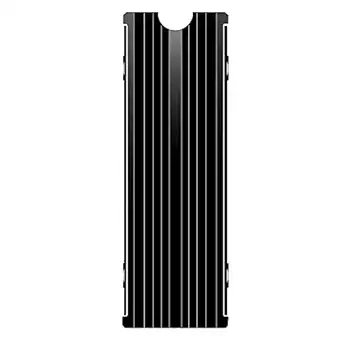
Keeping your M.2 SSD cool is essential for steady performance and longevity. The M.2 Heatsink Cooler 2280 SSD with Thermal Pad Black offers an effective temperature reduction solution tailored for desktop PCs and PS5 consoles. It is designed to fit popular SSD models such as Samsung 860 EVO, 960 EVO, 970 EVO, and 980 Pro.
Made from aluminum alloy with silver plating, this heatsink supports static electricity elimination and presents an anodic oxidation surface for durability. The included thermal silicone pad ensures excellent heat transfer without harming the SSD.
It claims a cooling effect ranging from 10°C to 20°C, which helps prevent overheating and throttling during intense operations. Installation is simple thanks to the double-sided clip design, providing a stable and protective mount compatible with M.2 NVME SSDs of various heights.
This cooler is ideal for users wanting reliable thermal management to maintain system stability and extend SSD lifespan. Overall, it balances efficient cooling, solid build quality, and user-friendly installation, well-suited for both gaming consoles like PS5 and desktop PC applications.
Pros
- Effective 10-20°C temperature reduction
- Aluminum alloy with silver plating
- Easy clip-on installation
Cons
- No included components other than heatsink
- Only fits M.2 2280 SSDs
- Limited to single-sided SSDs
Who Should Buy It?
Ideal for PC builders and PS5 owners seeking improved SSD cooling. Suits users with M.2 2280 NVME SSDs wanting to reduce thermal throttling. Perfect for those looking to maintain system stability during demanding workloads without complex installation.
Key Specifications
| Specification | Details |
|---|---|
| Product Dimensions | 3″L x 0.95″W x 0.4″H |
| Cooling Method | Passive (Aluminum alloy heatsink with thermal silicone pad) |
| Compatible Devices | Desktop PCs, PS5, M.2 NVME SSDs (single-sided Type 2280) |
| Material Type | Aluminum alloy with silver plating and anodic oxidation surface |
| Mounting Type | Double-sided clip mount |
The product dimensions of 3 inches long, 0.95 inches wide, and 0.4 inches high ensure the heatsink fits well within standard M.2 2280 SSD slots in both desktop PCs and PS5 consoles. The cooling method uses a passive aluminum alloy body with a thermal silicone pad, which transfers heat away from the SSD without any moving parts. This design means no noise or additional power consumption, making it a simple and quiet cooling solution. The clip mount provides a secure hold suitable for various SSD heights, enhancing versatility and protection during installation.
The aluminum alloy with silver plating improves heat dissipation while reducing static electricity, contributing to the durability and reliability of the heatsink. Compatible with popular NVME SSD models and single-sided drives, it efficiently lowers temperatures by 10-20°C. This cooler benefits users who run demanding workloads or gaming setups by preventing thermal throttling and maintaining SSD performance. Its easy installation suits those who want hassle-free upgrades without complex tools or additional cooling systems.
6. 100 PCS Heatsink Kit for Raspberry Pi Models A B+ 4 5

Small electronic devices like Raspberry Pi models can generate significant heat during operation, which may impact performance. This 100-piece heatsink kit provides a versatile cooling solution with various sizes to suit different components. The kit contains 80 aluminum and 20 copper heatsinks, each pre-applied with high-adhesion thermal tape for easy installation.
Its compact design fits well on Raspberry Pi boards and many other small electronics. The thermal adhesive ensures a secure fit and effective heat transfer, making it a reliable cooling accessory.
Ideal for DIY electronics projects, it helps maintain device stability without requiring fans. The broad selection of sizes means it can be used on a variety of chips and components.
Overall, it offers a practical way to improve thermal management. It is well-suited for Raspberry Pi users who want to keep temperatures down and enhance performance with minimal setup.
Pros
- Includes 100 heatsinks in 8 sizes
- High-viscosity, long-lasting thermal tape
- Compatible with many Raspberry Pi models
Cons
- No active cooling included
- Not suitable for high-power CPUs
- Heatsinks are small, limited coverage
Who Should Buy It?
This product fits Raspberry Pi users needing passive cooling for multiple components. It also suits hobbyists working on electronics projects requiring heat dissipation without fans. Those wanting a large variety of heatsink sizes in one kit will find it handy.
Key Specifications
| Specification | Details |
|---|---|
| Product Dimensions | 0.55″L x 0.55″W x 0.27″H |
| Cooling Method | Passive heatsink cooling |
| Compatible Devices | Raspberry Pi, Single-board Computers, Electronic Components |
| Material Type | Aluminum and Copper |
| Mounting Type | Panel Mount with thermal adhesive tape |
The product dimensions show compact heatsinks just over half an inch on each side and very thin, making them ideal for small single-board computers like Raspberry Pi. Passive cooling means no fans; heat is dissipated through the metallic surface. The inclusion of both aluminum and copper allows better heat conduction, while adhesive tape simplifies installation by securing heatsinks directly onto chips. Compatibility with various Raspberry Pi models and other electronic parts increases usability for different projects.
These specifications result in a quiet, maintenance-free cooling solution suitable for low to moderate heat sources. Aluminum provides lightweight, affordable cooling, whereas copper parts improve thermal performance. The panel mount style and pre-applied adhesive tape ensure quick setup without extra parts. Users who value silent operation and easy installation benefit most from this kit. However, those needing heavy-duty cooling or fan-based airflow might need more robust options.
7. Raspberry Pi 4 Heatsink Kit 30 PCS

Keeping your Raspberry Pi cool is essential for stable operation, and this 30-piece heatsink kit offers a comprehensive solution. With a mix of aluminum and copper heatsinks, it supports a wide range of Raspberry Pi models, enhancing heat dissipation effectively. The kit includes thermal conductive adhesive tape that ensures secure attachment and optimal heat transfer.
It covers models A, B, B+, 2, 3, 4, and 5, making it compatible with many Raspberry Pi setups, including various cases. The package contains 24 aluminum heatsinks and 6 copper heatsinks.
Lightweight and straightforward, the heatsinks are easy to install and can also be used with other devices like Beaglebone boards. The mix of materials provides efficient cooling tailored to different components’ needs.
This kit stands out for its versatility, reliability, and strong thermal performance, making it a solid choice for managing Raspberry Pi temperatures. Suitable for users who want a well-rounded cooling pack for various projects, it balances performance and ease of use while offering good value by providing ample heatsinks in one package.
Pros
- Includes both aluminum and copper heatsinks
- Thermal adhesive tape for easy mounting
- Compatible with multiple Raspberry Pi models
Cons
- No active cooling included
- Limited to Raspberry Pi and similar boards
- No detailed installation instructions provided
Who Should Buy It?
This kit is ideal for Raspberry Pi users needing reliable passive cooling for multiple devices. It suits hobbyists, DIYers, or educators who want a flexible solution compatible with various Raspberry Pi models. Those working on extended projects or heat-sensitive tasks will benefit most.
Key Specifications
| Specification | Details |
|---|---|
| Cooling Method | Passive heat dissipation |
| Heat Pipes Count | None |
| Fan Size | None |
| Maximum Rotational Speed | None |
| Noise Level (dB) | None |
| Air Flow Capacity (CFM) | None |
| Compatible Devices | Raspberry Pi models A, B, B+, 2, 3, 4, 5, Beaglebone |
| Material Type | Aluminum and Copper |
| Power Connector Type | None |
| Voltage | None |
This heatsink kit is designed primarily for passive cooling of Raspberry Pi boards including models A through 5. It uses both aluminum and copper materials to dissipate heat without requiring fans or power connectors. This means the kit operates silently and without consuming additional power. The thermal adhesive tape makes for easy and durable attachment to the processor or other heat-producing components. By covering multiple Raspberry Pi versions, it offers broad compatibility and flexibility for varied setups and projects.
Because this kit doesn’t include fans, it produces no noise, making it ideal for quiet environments or classrooms. The use of copper and aluminum affects heat transfer efficiency and overall durability. Aluminum is light and disperses heat well, while copper conducts heat even more efficiently. This combination enhances cooling performance without added bulk. Users who want quiet, maintenance-free cooling for Raspberry Pi devices or similar boards will find this kit practical and effective.
8. NVMe M.2 SSD Aluminum Heatsink for PS5 & PC

Managing SSD temperatures is vital for stable PC and console performance. This NVMe M.2 SSD Aluminum Heatsink offers practical cooling designed for budget-conscious users.
It supports M.2 2280 NVMe SSDs and helps reduce temperatures by 10°C to 30°C. The double-sided aluminum alloy heatsink increases surface area, promoting efficient heat dissipation. Thermal performance is enhanced with nano-silicon thermal pads, which conform well to SSD surfaces without affecting warranty stickers.
Its screw-based mount makes installation quick and straightforward, ideal for users lacking advanced tools. The anodized finish adds durability and corrosion resistance for long-lasting protection. This heatsink is a solid solution for those aiming to stop throttling and extend SSD life with an affordable and easy-to-use accessory.
Suitable for desktop PCs and PS5, it fits popular Samsung M.2 drives but excludes dual-layer hard drives.
Pros
- Effective double-sided cooling reduces SSD temperatures
- Easy screw installation with included tools
- Durable aluminum alloy with corrosion resistance
Cons
- Not compatible with dual-layer SSDs
- No active fan cooling included
- Limited to M.2 2280 form factor
Who Should Buy It?
Ideal for budget users needing reliable cooling for single-layer M.2 NVMe SSDs. Great for PC and PS5 owners who want straightforward installation and steady thermal performance without complex setups or additional power needs.
Key Specifications
| Specification | Details |
|---|---|
| Product Dimensions | 3″L x 0.95″W x 0.4″H |
| Cooling Method | Double-sided passive heatsink with thermal pad |
| Compatible Devices | Desktop PCs, PS5, M.2 2280 NVMe SSDs |
| Material Type | Aluminum alloy with silver coating and anodized finish |
| Mounting Type | Screw mount |
| Item Weight | 0.04 kg |
The compact dimensions of 3 inches by 0.95 inches and 0.4 inches height fit neatly on standard M.2 2280 NVMe SSDs. Double-sided passive cooling means there is no fan, relying entirely on heat dissipation through the aluminum fins and thermal pads. Compatibility includes most desktop PCs, PS5 consoles, and popular M.2 NVMe SSD brands, making it versatile for common gaming and workstation builds. The lightweight 0.04 kg adds minimal mass, so it does not stress the SSD socket or motherboard.
This heatsink’s aluminum alloy material and anodized finish ensure good heat transfer and durability under prolonged use. The screw mount style allows easy installation without specialized tools, ideal for budget users and those upgrading older systems. The absence of fans means silent operation but limits cooling to passive methods suited for moderate workloads. Users with high-performance or dual-layer SSDs might need more advanced cooling solutions. Overall, it’s well-suited for steady, quiet, and affordable SSD temperature management.
9. Large Aluminum Heat Sink 150x93x15 mm with Adhesive Tape

Managing heat across large surfaces calls for a cooling solution that can cover substantial area efficiently. This Large Aluminum Heat Sink, measuring 150x93x15 mm, excels in providing wide coverage for cooling components that generate significant heat.
Made from aluminum with 294 fins, it offers an extensive surface area to disperse heat effectively without using a fan, reducing noise and mechanical failure risks. The pre-applied thermal conductive adhesive tape simplifies installation, allowing users to attach it firmly to various hardware. Its thickness of 4.3mm at the base ensures stable contact and optimal heat transfer.
This heatsink fits well with devices like GPUs, HDDs, routers, and power transistors, where passive cooling helps maintain safe operating temperatures. The sturdy build and black anodized finish add durability and a sleek look. Performance-wise, it efficiently lowers temperatures by increasing thermal dissipation across a broad area.
Ideal for users seeking a quiet, reliable passive cooling solution for sizable electronic components. Value comes from its high-quality material, ease of use, and compatibility across multiple devices, making it a versatile addition for hardware maintenance or upgrades.
Pros
- Large surface area for better heat dissipation
- Pre-applied thermal adhesive tape for easy installation
- Passive cooling reduces noise and failure risk
Cons
- No active cooling limits heat management under extreme loads
- Relatively thick, may not fit in tight PC cases
- Single heatsink only, may need multiples for some setups
Who Should Buy It?
This heat sink suits users needing effective passive cooling for large PC components or electronics. Ideal for those who prioritize noise-free operation and want to prevent overheating in devices like GPUs, routers, or power amplifiers. It is also great for custom builds or repairs requiring durable and broad-area heat dissipation without fans.
Key Specifications
| Specification | Details |
|---|---|
| Product Dimensions | 150 x 93 x 15 mm (5.9 x 3.66 x 0.59 inches) |
| Cooling Method | Passive Cooling |
| Material Type | Aluminum |
| Compatible Devices | PC Computers, GPU HDD, Graphics Card RTX 3090 3080 ti, Power Transistors, FETs, ICs, Power Amplifiers, Docking Station, Voltage Regulators |
| Mounting Type | Panel Mount |
| Included Components | 1 x Anodized Aluminum Heatsink + Adhesive Tape |
The heat sink’s dimension of 150 x 93 x 15 mm means it covers a large surface, essential for spreading heat over a wide area. Its passive cooling approach relies on convection without fans, ideal for maintaining silence. The aluminum material allows heat to transfer quickly from components to the fins. Compatibility with various devices like GPUs and routers makes it versatile for multiple cooling needs. Pre-applied adhesive tape removes the need for extra steps during installation, fitting securely and reducing thermal resistance.
These specifications ensure steady temperature control by maximizing surface area and conductive contact. Passive cooling means no mechanical parts, which enhances durability and cuts down on noise. The thick base and many fins improve heat dispersion, beneficial for devices generating substantial heat but not requiring active cooling. Users working in quieter environments or with limited space appreciate its ease of fit and silent operation, especially for graphics cards like the RTX 3090 series or for electronic components needing reliable heat management.
10. Cooler Master Hyper 212 Black II CPU Air Cooler

A standout cooling solution designed for powerful CPUs, the Cooler Master Hyper 212 Black II offers efficient heat dissipation with a sleek, modern appearance. It delivers stable performance even under heavy workloads, making it a reliable choice for gamers and content creators alike. Featuring Direct Contact Technology, the four copper heat pipes optimize heat transfer directly from the CPU surface.
This cooler supports up to 220W thermal design power, ensuring it can handle high-end AMD Ryzen and Intel processors with ease. The 120mm PWM fan runs quietly up to 1,750 RPM while providing strong airflow at 75.19 CFM.
Installation is simplified with a user-friendly bracket system, suitable for first-time PC builders. The minimalist black design adds an elegant touch to any desktop setup. Its aluminum and copper construction ensures durability, while the noise level stays low at 26 dB, maintaining a quiet environment.
Overall, this cooler balances performance, noise control, and aesthetics, making it ideal for those seeking solid cooling without excessive fan noise or complicated mounting.
Pros
- Efficient heat transfer with Direct Contact Technology
- Quiet operation at only 26 dB noise level
- Easy installation with user-friendly bracket design
Cons
- Maximum fan speed capped at 1,750 RPM
- Airflow could be higher for extreme overclocking
- Larger size may block some RAM slots
Who Should Buy It?
Ideal for PC users who want effective CPU cooling with minimal noise. Perfect for gaming and productivity setups using AMD Ryzen or Intel processors. Suitable for builders seeking straightforward installation and a stylish, low-profile air cooler.
Key Specifications
| Specification | Details |
|---|---|
| Product Dimensions | 4.84″L x 3.03″W x 6.25″H |
| Cooling Method | Fan |
| Heat Pipes Count | 4 |
| Fan Size | 120mm |
| Maximum Rotational Speed | 2500 rpm |
| Noise Level (dB) | 26 |
| Air Flow Capacity (CFM) | 42 |
| Compatible Devices | CPU, Desktop |
| Material Type | Aluminum, Copper, Plastic |
| Power Connector Type | 4-Pin |
| Voltage | 12 volts |
The Cooler Master Hyper 212 Black II features four copper heat pipes and a 120mm PWM fan that operates at up to 2500 RPM. Its compact dimensions make it compatible with many desktop setups, while a noise level of 26 dB ensures quiet operation. The fan delivers an airflow capacity of 42 CFM, enough to maintain stable CPU temperatures during gaming or heavy tasks. The materials used include durable aluminum and copper, enhancing heat dissipation and overall longevity.
These specifications contribute to steady cooling performance and low noise, ideal for users seeking comfort and reliability. The 4-pin power connector allows PWM control for dynamic fan speeds, reducing noise when full power isn’t needed. Its compatibility with both AMD and Intel sockets maximizes versatility. The cooler suits gamers or professionals who demand consistent CPU performance without disruptive sound levels, and its easy installation makes it accessible for first-time PC builders.
Ultimate Buyer’s Guide to Choosing the Best Heat Sink for Your PC
Cooling performance
When selecting a heat sink for a PC, understanding how well it manages thermal conductivity and heat dissipation is key. Materials like copper and aluminum are often favored for their ability to transfer heat away from the processor efficiently, keeping temperatures low during heavy workloads.
A well-engineered airflow path helps move hot air away quickly while bringing in cool air, which complements the fan’s efficiency in maintaining steady cooling. Additionally, ensuring the heat sink matches the CPU’s Thermal Design Power rating guarantees it can handle the heat output without struggle, maintaining stable performance and preventing throttling.
Experienced users usually pay close attention to these features to maximize system reliability and longevity, particularly for those using their PCs for gaming or demanding applications. Purchasing a heat sink that balances these aspects often results in quieter operation and better overall temperature control, making it a worthwhile investment for any build.
Size and compatibility
When choosing the best heat sink for pc, keeping an eye on dimensions and clearance inside your computer case makes a big difference. A heat sink that is too large may not fit properly, causing installation headaches or blocking airflow, so checking available space beforehand is wise. Knowing the socket type of your motherboard helps narrow down compatible models, since a mismatch means the heat sink won’t attach securely.
Also, some designs extend over RAM slots or near the GPU area, which might interfere with tall memory modules or large graphics cards, so considering those clearances helps maintain smooth operation and prevents hardware conflicts. Matching a heat sink that fits smoothly with your case, motherboard, and surrounding components leads to better cooling efficiency and a hassle-free build experience.
Material and build quality
Choosing a heat sink for your PC involves paying close attention to its construction, which often revolves around the choice between copper and aluminum. Copper heat sinks excel at transferring heat thanks to their superior thermal conductivity, making them a solid choice for systems running demanding applications. Aluminum options tend to weigh less and usually come at a more budget-friendly price point while still providing effective cooling for everyday use.
Aluminum options tend to weigh less and usually come at a more budget-friendly price point while still providing effective cooling for everyday use. The durability and corrosion resistance of these materials also matter since they impact the longevity of the heat sink under various environmental conditions. Copper generally offers better resistance to corrosion over time, although modern coatings on aluminum sinks have improved their durability considerably.
Another aspect that shouldn’t be overlooked is the fan quality integrated with the heat sink. Fans with high-quality bearings tend to operate more quietly and last longer under continuous use, which contributes to a quieter overall system during operation.
Balancing these factors according to the specific use case—whether it’s for daily computing or more intensive gaming and workstation tasks—can guide you in finding a heat sink that matches your cooling needs while fitting within your budget.
Installation and maintenance
Choosing a heat sink that fits seamlessly with your PC setup can make a big difference in performance and convenience. A good heat sink should come with easy-to-understand mounting options and all necessary accessories included, such as brackets, screws, and thermal paste, so you don’t have to hunt down additional components.
Compatibility plays a key role, especially if you want to pair it with existing fans or liquid cooling systems; checking socket compatibility with your CPU and clearance within your case can save a lot of hassle. Keeping your cooling solution in top shape requires routine cleaning since dust buildup can reduce efficiency; selecting a design that allows straightforward access for wiping off dust or vacuuming will make maintenance far less of a chore and help maintain consistent temperatures over time.
Price and warranty
Choosing the right heat sink for your PC comes down to finding a balance between how well it cools your processor and what kind of value it offers. A heat sink that delivers effective heat dissipation without overspending can improve your system’s stability and lifespan considerably.
Often, a product that seems affordable at first may lack durability or require frequent replacements, so paying attention to the build quality and materials used can save money and hassle down the line. Good manufacturers typically stand behind their products with solid customer support, helping to solve any issues and making it easier to get assistance when needed. Another factor worth keeping in mind is how easily replacement parts or compatible accessories are available, as this can keep your setup running smoothly without costly upgrades.
Overall, focusing on these aspects will help you pick a heat sink that not only fits your current needs but also remains reliable over time.
Additional features
Choosing the right heat sink for a PC involves more than just cooling performance; many models now come with RGB lighting and aesthetic options that can complement the overall look of your build. These visual elements add a personal touch, whether you prefer subtle glows or vibrant color schemes that sync with other components. Beyond appearance, some heat sinks offer software control and monitoring capabilities allowing users to track temperatures, adjust fan speeds, and customize lighting effects seamlessly through dedicated applications.
This level of control helps maintain a balance between cooling efficiency and noise levels. Speaking of noise, noise reduction technologies implemented in modern heat sinks contribute to quieter operation by optimizing fan blade design and using materials that absorb vibrations.
This makes a noticeable difference during intensive tasks or gaming sessions, helping create a more comfortable computing environment. When selecting a heat sink, weighing these features alongside your cooling needs and system compatibility can lead to a more satisfying and visually appealing setup.
How PC Heat Sinks Cool Your Processor
A heat sink helps keep your PC’s processor cool by moving heat away from it. This prevents the processor from getting too hot and slowing down or getting damaged.
The process is simple. First, the heat from the processor passes into the base of the heat sink. This base is made of a material that conducts heat well, usually metal like aluminum or copper.
Next, the heat travels through thin metal fins attached to the base. These fins have a large surface area, which helps spread the heat out.
Finally, the heat leaves the fins by moving into the air around them. Many heat sinks use a fan to help blow air over the fins. This airflow carries heat away from the PC.
Using a heat sink keeps your processor cooler, which helps it work smoothly and lasts longer.
- Processor creates heat.
- Heat moves to the heat sink base.
- Heat spreads to metal fins.
- Air (often with a fan) removes heat from fins.
- Processor stays cool and works well.
FAQ’s
What Factors Should I Consider When Choosing The Best Heat Sink For My Pc?
When choosing the best heat sink for your PC, consider the CPU socket compatibility, cooling performance, size constraints within your case, and noise levels. Additionally, evaluate the thermal design power (TDP) rating and the type of cooling (air or liquid) that suits your system’s needs.
How Does The Size Of A Heat Sink Affect Its Cooling Performance In A Pc?
A larger heat sink has more surface area, which improves heat dissipation and enhances cooling performance in a PC. Conversely, smaller heat sinks may struggle to effectively transfer heat away from components, leading to higher temperatures.
Are Air Cooling Heat Sinks Or Liquid Cooling Solutions Better For Pc Temperature Management?
Liquid cooling solutions generally provide better PC temperature management, especially for high-performance or overclocked systems, as they dissipate heat more efficiently. However, air cooling heat sinks are often sufficient for standard use, being simpler, more cost-effective, and easier to maintain.
Which Materials Are Commonly Used In The Best Pc Heat Sinks, And Why?
The best PC heat sinks commonly use aluminum and copper because aluminum is lightweight and affordable with good thermal conductivity, while copper offers superior heat conduction to efficiently dissipate heat from the CPU or GPU. Combining both materials leverages copper’s heat transfer with aluminum’s ability to disperse heat over a larger surface area.
Can Installing A High-Quality Heat Sink Improve The Overall Lifespan Of Pc Components?
Yes, installing a high-quality heat sink can improve the overall lifespan of PC components by effectively dissipating heat and preventing overheating. This helps maintain optimal operating temperatures, reducing thermal stress and potential damage over time.
Final Verdict
The Thermalright Peerless Assassin 120 SE stands out as the best heat sink for PC users seeking reliable cooling and quiet operation, making it suitable for most builds. For those on a budget, the Thermalright Assassin X120 Refined SE offers excellent performance without compromising affordability, ideal for value-conscious buyers. The Cooler Master Hyper 212 Black II is a solid choice for users wanting a premium CPU air cooler with a sleek design and effective cooling.
Meanwhile, the ARCTIC M2 Pro targets those looking to enhance SSD cooling, helping maintain drive performance and longevity. Each product serves a specific need, so choosing depends on the type of component you want to cool and your budget.
Select the heat sink that matches your cooling requirements and budget to get the best results for your PC.